Nova Recorder
SCREEN RECORDINGv2.0.0Record SketchUp without leaving it — chapter markers, YouTube chapters, zero lag.
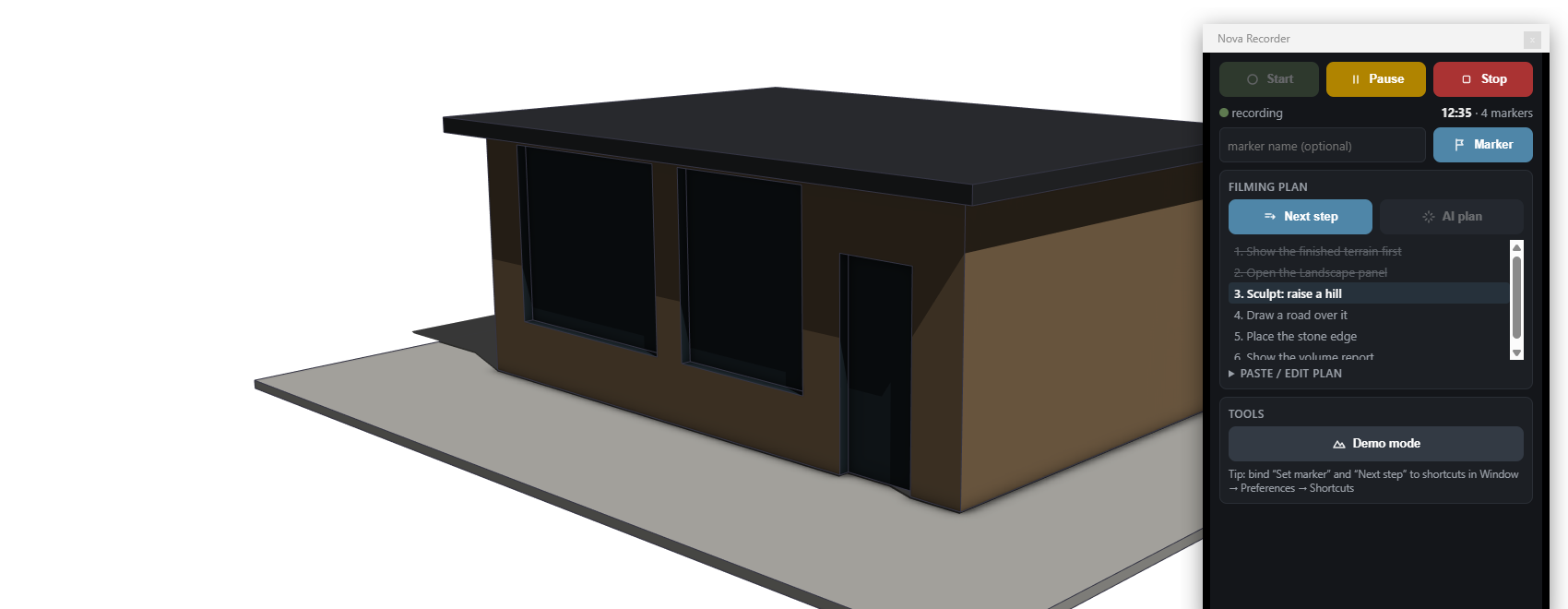
What Nova Recorder does
Recording SketchUp is easy to get wrong. You start OBS, alt-tab back, model for forty minutes — and then find out the scene was pointed at the wrong window, the microphone was muted, or the take is one long unnavigable block you now have to scrub through to find the three moments that mattered.
Nova Recorder puts the whole thing in a small panel inside SketchUp and lets OBS do the heavy lifting in the background. One click starts a recording with a 3-2-1 countdown. One click stops it. In between, you never leave the model.
It is free, permanently, with every feature open.
The pre-record check
Before the countdown runs, Nova Recorder shows you a live thumbnail of exactly what OBS is about to capture — the real frame, not a guess — plus a warning if your microphone is muted and a warning if the encoder settings will bite you. Black takes and silent takes are the two ways a recording session gets thrown away, and both of them are visible in that thumbnail before you have wasted a minute.
Markers become YouTube chapters
While you record, a marker is one keystroke away — the shortcut is yours to bind. Each marker is stamped against the recording timeline.
When you stop, Nova Recorder writes two files next to the video: markers.json
for your own tooling, and a chapters.txt you paste straight into a YouTube
description as the video’s chapter list. Then it opens the folder. The step
between “I finished recording” and “the video is published with chapters” is a
copy and a paste.
The filming plan
Paste in a plan — or have one written for you if you have the claude CLI
installed locally (entirely optional; the panel works the same without it) — and
the plan appears as a list of steps beside the recorder. Clicking next step
does two jobs at once: it moves the plan forward so you always know what you are
saying, and it drops a chapter marker at that exact moment. Work through the
plan and the chapter list writes itself.
Key features
- One-click recording — start with a 3-2-1 countdown, stop with the same button. The panel lives inside SketchUp.
- Pre-record check — a live thumbnail of the exact frame OBS will capture, plus microphone-mute and encoder warnings, before the countdown starts.
- Zero overhead while recording — nothing polls, nothing runs in a loop. The machine stays free for modelling, which is the point of recording it.
- Chapter markers with bindable shortcuts — mark a moment without touching the mouse or breaking the flow of what you are demonstrating.
- Filming-plan panel — paste a plan (or generate one via a local
claudeCLI if you have one). Each next step click advances the plan and drops a marker. - Automatic tool-change log — every tool switch is logged as an event, so you can see what you actually did and when.
- YouTube chapters on stop —
markers.json+ a ready-to-pastechapters.txtwritten next to the video, and the folder opens for you. - Demo mode — one click cleans the viewport for filming: guides, axes and section planes hidden. One click puts them all back.
- Zero-config OBS connection — it reads OBS’s own WebSocket configuration, so there is nothing to type in. If OBS is not running, it launches minimised.
Use cases
- Plugin and workflow tutorials — record the demonstration, mark each step as you reach it, publish with chapters the same hour.
- Client walkthroughs — talk through a model on screen and send the recording, chaptered so the client jumps straight to the kitchen or the roof.
- Crew and apprentice instruction — record how an assembly goes together once, chapter it, and stop answering the same question on site.
- Bug reports and support — a recording with markers on the exact moments something misbehaved says more than three paragraphs of description.
- Course material — a filming plan, a marker per step, and a chapter list per lesson, produced without an editor.
- Design review logs — capture the session, keep the tool-change log, and have a record of how a decision was reached.
Who it’s for
Nova Recorder is for anyone who records SketchUp on Windows and wants the result usable straight away: tutorial makers, plugin developers, teachers, designers sending walkthroughs to clients, and anyone who has lost a take to a muted microphone. It was built by a Norwegian building design company, to record its own tools — and it is given away because a recorder that works should not be a purchase decision.
What you get
nova-recorder.rbz(works in SketchUp 2021+, Windows)- User guide (PDF) — OBS setup, shortcuts, filming plans and chapter export
- Free forever — no licence key, no activation, no expiry
- Email support
System requirements
- SketchUp 2021 or newer
- Windows 10/11 — Windows only
- OBS Studio 28 or newer, which is free and open source. Nova Recorder talks to it over OBS’s own WebSocket and reads that configuration itself, so there is nothing to set up by hand.
- A local
claudeCLI is optional, and only used if you want a filming plan generated instead of pasted.
License
Free. There is no licence gate in this plugin, no token to paste and nothing to activate — install the .rbz and it runs. Updates are free too.